
Round Quick Views

Quick Overview
Quick View round reports are equivalent to a snapshot of the STOPECALCTM Rounds view and are generated in the same way as Face Quick Views. All of the key Header, Intervals and Results are listed on a landscape-format page for each of the faces selected for viewing. If photos or maps have been uploaded to a face, the default photo is displayed on the view. Quick View reports can be published or sent to a printer. These reports are intended as communication tools for shift turnover, daily reports, or for bringing useful data underground on any portable device. No STOPECALCTM subscription is necessary to view a Quick View-generated report.
Opening a Quick View
To open a Quick View, first Select one or more rounds from the filtering dialog. Perform any edits or calculations and make sure the changes are saved.
Navigate to the Quick View button and click on it to see a Quick View of all the rounds selected spawned in a new browser window. A new tab will open in the open web browser where a File Save dialog will immediately appear. Here, the Quick View can be sent to a printer or published. To view the report only, simply cancel the dialog, allowing paging through the report in the browser tab.
Quick View reports can be copied to a tablet or other mobile device for offline use. Each round will compose a separate page that can be reviewed by paging through the document, as in the example below:
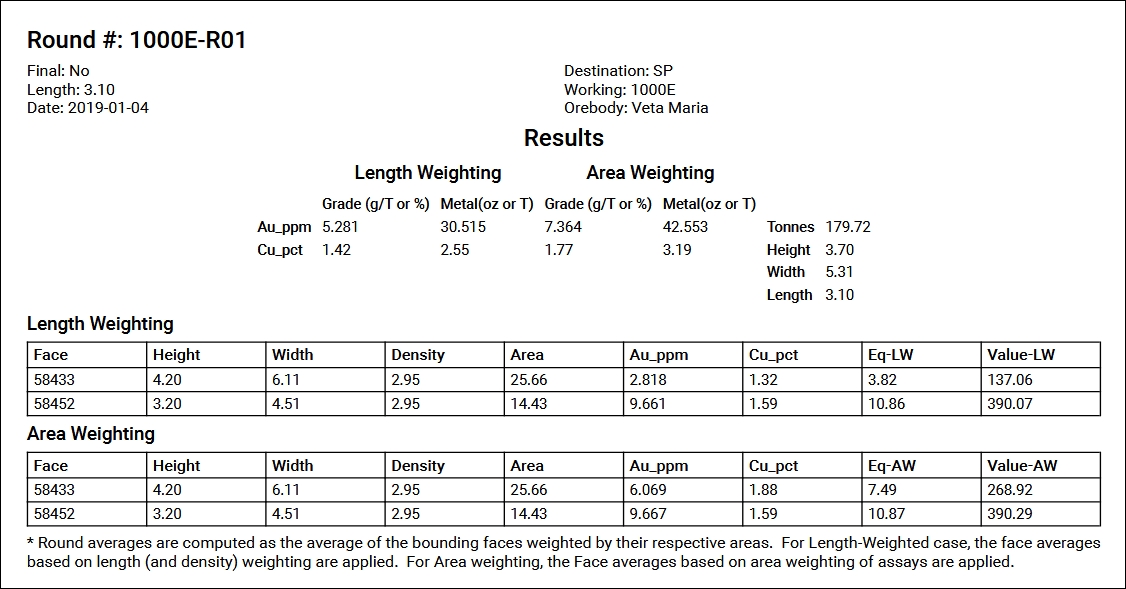
The Results section includes a table with the grade and metal content of the round by each weighting method. Tonnes derived from the area-weighted face bulk densities, and round dimensions are listed to the right of the table.
To return to STOPECALCTM just close the Quick View tab or navigate to the STOPECALCTM tab.