
Face Full Report

Face Full Report Overview
The STOPECALCTM face report is provided for two purposes: 1) Report cut-and-fill, or other multi-face production unit; and 2) Compare actual production to the in-situ resource for dilution tracking and/or reconciliation.
The Face Report provides a listing of all face information for all of the faces currently selected in the Faces view. Face reports can also be run on larger selections of data than can be viewed in the Faces view (see Filtering Data). At the bottom of the listing the user will find a calculation section that provides total tonnage and assay averages for full face and economic zone by each weighting method. The report can be opened in EXCEL to review and/or drop in a custom format of the user's choice. At the top of the report the user will see a listing for the input and calculated face data. Below this is the summary section, such as the example for heading 1000W in the Lucky Dollar example database (boldface added here):
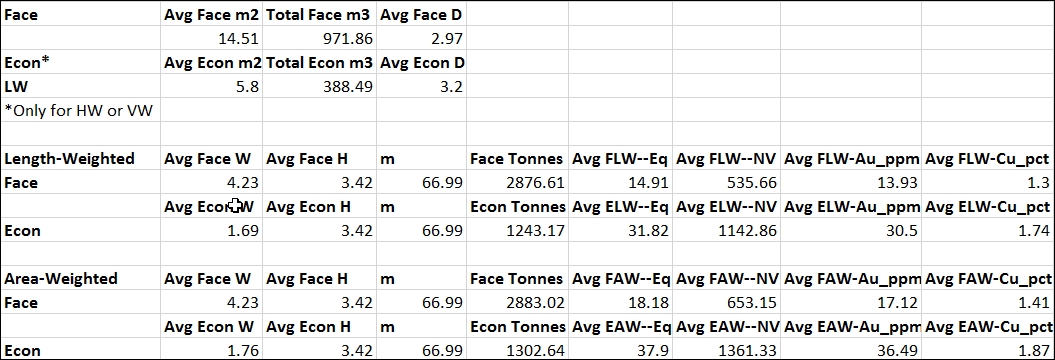
Results for the area-weighted face density are shown on the second line of the summary. The bottom section gives the results for each metal for the full face and the economic portions, and for each metal. The field "m" records the total length of development represented by the faces or sample lines. Separate reporting of full-face and economic zone allows an assessment of the dilution incurred.
Dimension units listed in the report are meters. Grade units are g/T (ppm) for precious metal grade items and percent for other metals. The face report does not list metal quantities, but these can be calculated in EXCEL from the tonnes and grade items. Face reports are appropriate for stopes and raises where volumes are blasted and extracted across many "faces" or sample lines at one time. See additional discussion at the end of the topic Round Full Report.