
Round Validation

Why Validate?
Rounds, like faces should be validated at several points in the process of producing final development grade and tonnage reports. Spatial, temporal and calculations can be subject to errors originating exterior to STOPECALCTM or from within the program.
Rounds View Checks
It is advisable to make a final check of the Rounds view screen before saving or running a report. Each round should have Date and Length entries. Zone, Working and Orebody are usefula and may be necessary to fully enable report filtering. The round Destination should be checked because this is a field that may change during the course of mucking and stockpiling. Each round should have two bounding faces with data in all of the displayed fields and the Auto Calc option selected in the Rounds section, otherwise Length should be inserted.
Upon calculation, all fields in the Results window should have values. If any boxes have missing results, this indicates a problem with the data entered in Rounds or with the bounding faces selected.
Graphic Checks
Spatial validation can be accomplished by creating a filtered round report and eliminating the summary line at the bottom of the file. This can be imported to Micromine or other mine visualization software, plotting the central coordinates as points. The method can help identify mis-allocation of bounding faces because all points should plot exactly between quasi-drill hole plots of faces or in the center of plan polygons previously digitized to represent the rounds.
Data in the points file can be merged with the polygons to create attributes that can be color-coded and/or labeled to show grade, destination, date, tonnes, or other variable. In the plot shown below, the reviewer has plotted the rounds as labels at the round centroid to check for gaps and sequential labeling:
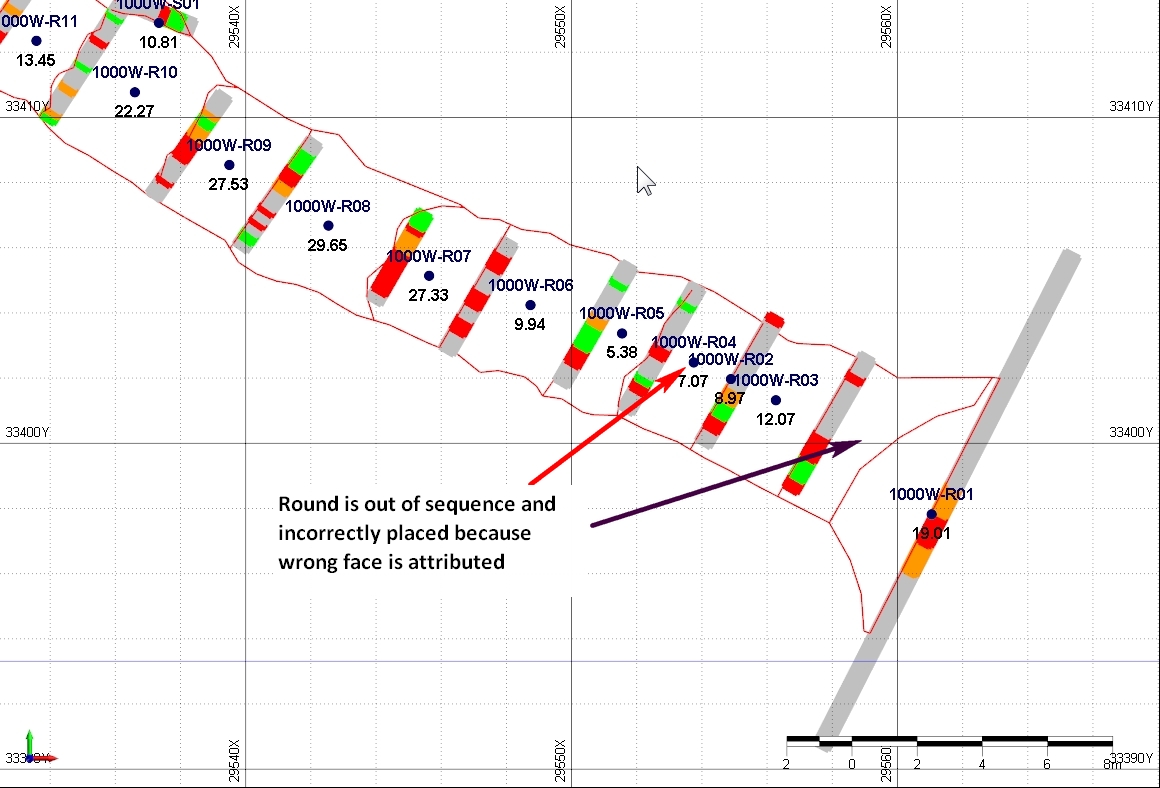
R02 has apparently valid data but it is located incorrectly. The red arrow shows the plotted round centroid from STOPECALCTM Rounds X,Y, Z calculations. The wrong face was attributed to this round and it should be located in the position indicated by the black arrow. Because the grade and tons data look reasonable at first glance, this type of error may not be detected without a graphic check. The reviewer may also check for anomalous dates in a sequence of rounds, for round destinations (e.g., Waste, SP, Mill) that are incorrect or do not appear to be correct based on grades in bounding faces or as calculated in the round. In some cases, the round may have been mis-classified in error, despite the data. This happens when decisions are made based on incomplete data like a single face, or from poor communication. The corrected plot below shows the status of each round colored by Destination:
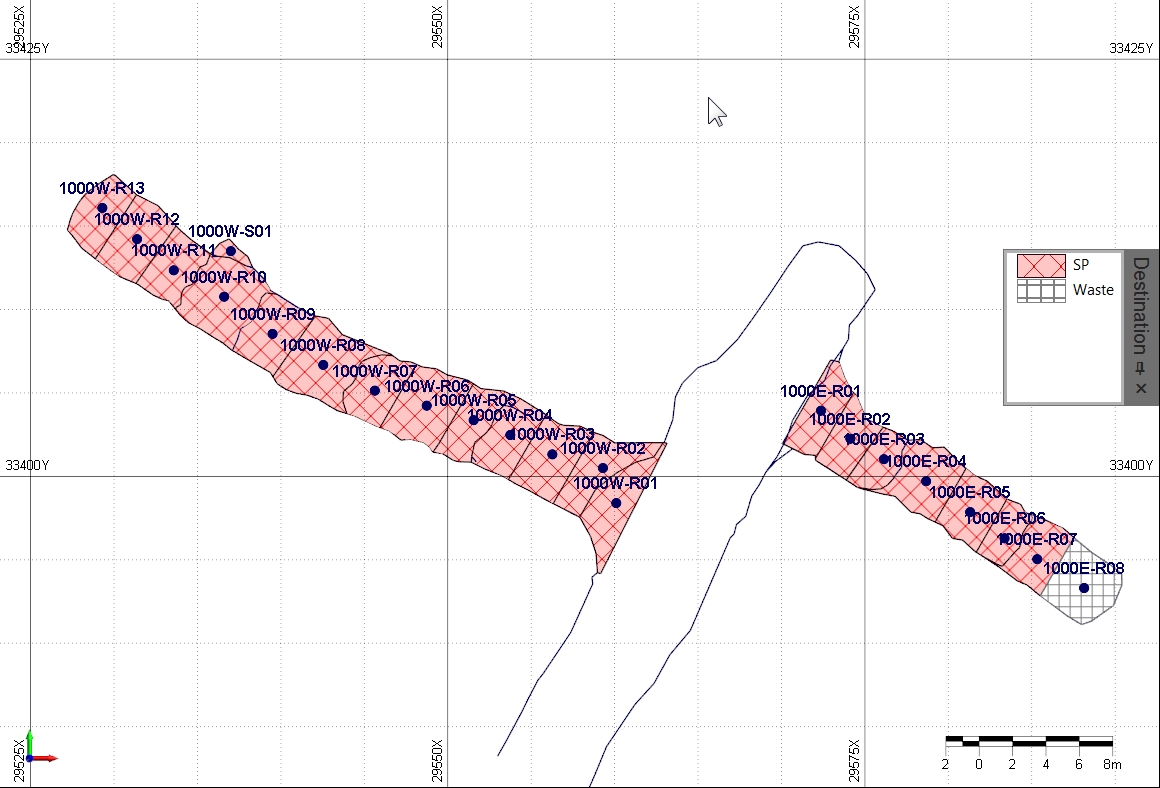
One round was sent to waste and the rest to a stockpile, as shown by the shading in the polygons merged to the Rounds report. The errors causing incorrect round location and values are fixed.
Other Checks
Besides available graphic tools, the user can run a face report or a round report and look for anomalies in dimensional measurements or calculated densities. Blank lines or fields may indicate that the data needed to calculate them is incomplete.
Preliminary vs Final Data
The Final status of rounds should be periodically verified by the administrator. If the Final box is not checked, faces or rounds with final results can be inadvertently overwritten by subsequent calculations. On the other hand, if the Final box has been checked before data is final, calculations are not updated with the most current data.
Survey Volume Adjustments
In many mines, development and/or stope openings are surveyed. Mine production tonnage is generally reported using these surveys, adjusting for stockpile movements. Round volumes should be compared and reconciled to survey volumes. A suggested acceptance criterion for Rounds results is 5%. Larger variances should be investigated as they may be due to improper definition of faces or rounds. Remember that if the Auto Calc option is selected for face width, the width of the face is the width of the sample line. If it is not checked, and the user inserts a width value greater than the sample line width, the extra width is counted as dilution.
Assuming survey and Rounds volumes are within tolerances, the user may wish to use the survey-adjusted Rounds volume and the Rounds average density to report mined tonnes. It is a user decision whether or not to treat positive adjustments to surveyed volume as extra dilution. The decision will vary by specific mine experience, or on a case-by-case basis. For example, some extra volume may be taken later for waste, or be due to a groundfall that is sent to waste. In this case, adjustments to Rounds volumes for reporting purposes should not be applied globally as ore dilution. In fact, for complete accounting, dummy faces and rounds should be created for these volumes so that they report as waste and reconcile to other mine data.