
Calculating Rounds

Rounds are ready for calculation of tonnes, grade and net value if the Rounds section of the view is filled out, bounding faces selected, and bounding faces have been calculated and saved in the Faces section. Each round must have at least one, and no more than two bounding faces assigned to it in order to enable calculations.
Assumptions
STOPECALCTM makes some assumptions behind the calculations:
Volumes are based on measurements and prismatic shapes assuming no curvature. They are approximations to be reconciled to survey by adjustment. Unless workings are excavated by a TBM it is likely that the volume enclosed by the faces is somewhat different than the volume extrapolated from the bounding faces.
Each bounding face area must have complete information to enable round calculations: central coordinates, face area, length-weighted and area-weighting grades, and face density are fields that must not be blank.
Grade units are ppm (g/T) for precious metals and % for other metals. Metal quantities are expressed as troy ounces for precious metals and metric tonnes (T) for percent metals. All tonnages and densities are expressed as metric units.
The round volume is calculated from the averages of the individual face dimensions multiplied by the length of the round calculated from the distance between face central points (see Auto Calc Calculation Options, below).
STOPECALCTM uses a standard weighted average formula to derive the round density and grades, expressed generally as:
Weighted Avgx = w1x1 + w2x2 ...wnxn/Σ(w1...n)
w = weights
x = value
Values are the individual face densities or grades, and the weights are each face area. The formulas are equivalent to EXCEL sumproduct of the weights and the values divided by sum of the weights. The sample areas just need to be relatively correct; STOPECALCTM effectively normalizes them to the total face area when doing any calculations. The denominators will generally vary between length-density weighting and area-density weighting scenarios, yielding different average results.
Auto Calc Calculation Options
Round length can be input manually or calculated by checking the Auto Calc option. Length is equal to the true distance (d) between bounding face central coordinates:

Length permits the calculation of the volume attributable to each face which is equal to the average area of the bounding face multiplied by the length.
Otherwise, the user must de-select Auto Calc and manually enter the length of the round. Rounds must have a valid length in order to calculate average values.
Calculating a Round
Rounds can be calculated individually or by selection, depending on option chosen, as shown below:
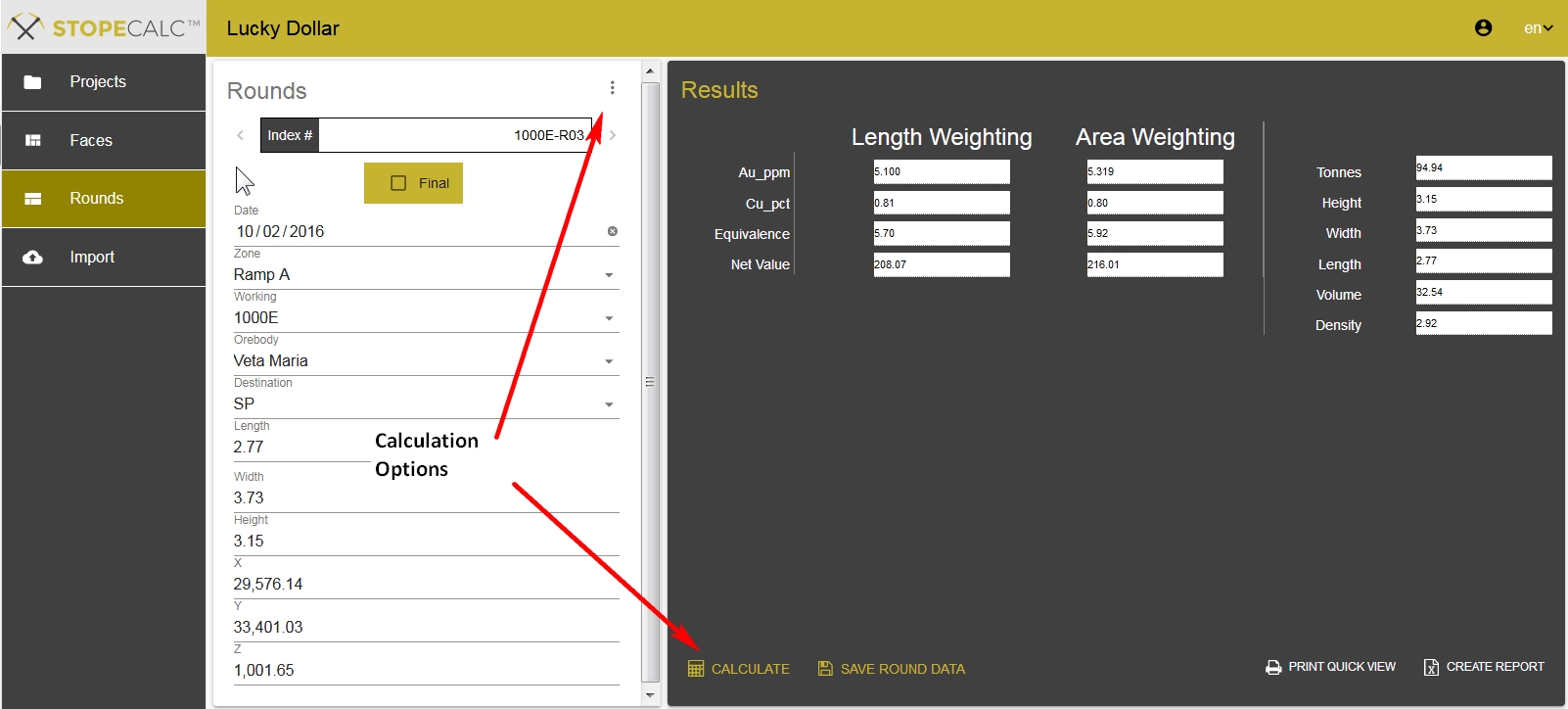
If the Calculate All option is selected from the radio button dropdown menu, all currently selected rounds will be calculated. If the user wants only to calculate the currently displayed round, the Calculate item is selected at the bottom of the Results section.